
On Apple Watch
The rating watch is already on your wrist.
Leave the phone in the boathouse and the dedicated rate watch in the shed. Strokes Per Minute runs natively on Apple Watch—tap at the catch, count three strokes, tap again, and read the rate at a glance.

Free to download. Try every feature free for 3 days.
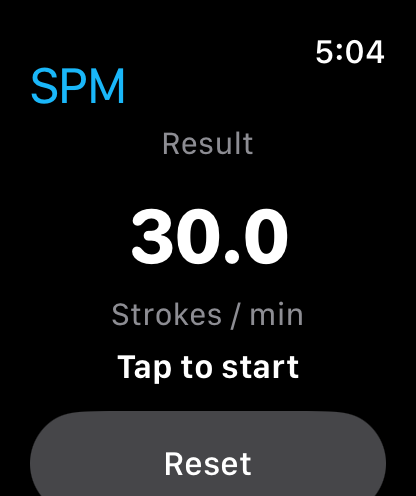
One less thing to clip to a lanyard.
A traditional rowing rating watch does one job well, right up until the morning its battery dies, its lanyard snaps, or it stays on the hook in the boat shed. Meanwhile, your Apple Watch is already strapped to your wrist before you walk out the door.
Strokes Per Minute brings the classic tap-timing workflow to watchOS without clutter. There are no GPS maps to drain your battery, no Bluetooth impeller sensors to pair, and no tiny menus to navigate with cold fingers. You get a clean dark screen, a full-face tap area, and an instant strokes-per-minute reading.
Whether you are steering an eight from the coxswain’s seat, coaching from a bike along the towpath, or checking a training partner’s rate between pieces, the rating watch is always with you.
Why rowers and coaches use the Watch app
Standalone on the water
Once installed, the Apple Watch app times and calculates stroke rates completely on its own. Your iPhone can stay locked in the boathouse.
Whole-face tap target
With wet hands, gloves, or spray on the glass, you do not want to hunt for a small button. Tap anywhere on the watch face as the blades go in.
High-contrast numerals
Crisp white numerals on an OLED black background make the stroke rate readable in bright midday glare or pre-dawn mist.
Built for the coxswain's wrist
Check the crew's rhythm with a quick tap while keeping both hands on the rudder strings and your eyes down the course.
Included with the iOS app
The Apple Watch app installs alongside the iPhone and iPad app and shares a single purchase across all of your Apple devices.
Private by design
Timing taps and stroke rate readings stay on your wrist. No workouts, GPS tracks, or crew telemetry are uploaded anywhere.
How to rate a crew from your wrist
No modes to configure or sensors to pair before pushing off the dock.
- 1
Open Strokes Per Minute on Apple Watch
Add it to your Dock or a watch face complication so it is one tap away when the piece starts.
- 2
Tap at the first catch
Watch the blades enter the water and tap anywhere on the watch screen to start the 3-stroke sample.
- 3
Count three full strokes
Keep your eyes on the crew through three complete drive-and-recovery cycles while the watch times in the background.
- 4
Tap on the third catch to read the rate
Tap as the blades catch on the third stroke. The stroke rate appears immediately in large type; tap Reset when ready for the next check.
Apple Watch questions
Something else? Contact support
- Does the Apple Watch app need an iPhone nearby to work?
- No. Once Strokes Per Minute is installed on your Apple Watch, it times and calculates stroke rates independently on your wrist—no cellular connection or nearby iPhone required.
- Does the Watch app use the accelerometer or manual taps?
- It uses deliberate manual taps across three full strokes. Accelerometer-based stroke counters only work if the watch is strapped to a rower's wrist and often miscount in rough water; tap timing lets a coach, coxswain, or rower rate any crew accurately.
- Which Apple Watch models are supported?
- Any Apple Watch running watchOS 9.0 or later (Apple Watch Series 4 and newer, Apple Watch SE, and Apple Watch Ultra) paired with an iPhone running iOS 18 or later.
- Does the Apple Watch purchase cost extra?
- No. One purchase or subscription on the App Store unlocks Strokes Per Minute across your iPhone, iPad, and Apple Watch.
Put a rating watch on your wrist
Trusted by rowing coaches, coxswains and athletes since 2014. Download Strokes Per Minute and try every feature free for 3 days.