
For coxswains
Rate on the wrist.
Hands on the rudder, eyes on the course. The Apple Watch app gives you the crew's stroke rate with a tap, so you can call the change the moment the rate drifts instead of a minute later.

Free to download. Try every feature free for 3 days.
The stroke says the rate feels high. You need a number.
Halfway through a piece the stroke turns and says the rate feels high. You think it is a touch over. The coach’s launch is two hundred metres back and the cox box shows speed, not rate. What the crew needs from you is a number, now, so you can bring it down together.
The Apple Watch app exists for this moment. Tap on a catch, count three strokes, tap again, and the rate is on your wrist. Your hands never leave the rudder and your eyes never leave the course for more than a glance.
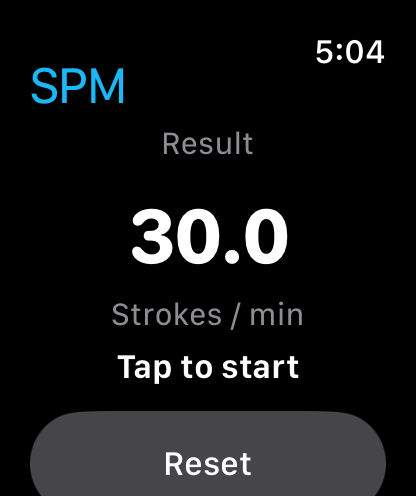
The Watch app keeps to the essentials: a result, a tap target and a Reset button. Everything else, the spoken rating and the stroke count setting, lives on the iPhone and iPad app that installs alongside it.
Made for the seat
One tap, one number
Tap to start, count the strokes, tap to finish. The Watch shows strokes per minute in large type and nothing else to read.
Hands stay where they belong
A tap on the wrist is faster than reaching for a phone or a cox box screen, and the rudder never moves.
Readable in any light
A white number on a black screen, sized for a glance. It reads the same at dawn and in full sun.
Same app, every device
The Watch app installs with the iPhone app and shares your purchase. Use the phone on the erg or from the bank, the Watch in the boat.
Nothing leaves the boat
Stroke rates and timing events stay on the device and are never sent to analytics.
Training only
Watches and phones should stay out of the boat during a regatta. On training days, it is the quickest honest number you can give a crew.
In the seat
A rate check during a steady-state piece takes about ten seconds.
- 1
Raise your wrist and tap
Tap the screen as the blades go in on a catch. Keep your other hand on the rudder.
- 2
Count three strokes
Watch the stroke seat, not the Watch. The app is timing while you count.
- 3
Tap on the final catch
The rate appears immediately. Tap Reset when you are ready for the next reading.
- 4
Make the call
Two beats above the target? Say so, with the number, and check again in a minute.
Questions coxes ask
Something else? Contact support
- Does the Watch app work without the phone nearby?
- Yes. Once installed, the Watch app times and calculates on its own. Leave the phone in the boathouse.
- Can the Watch speak the rate or change the stroke count?
- Not yet. Spoken results and the number of strokes to time are settings on iPhone and iPad. The Watch uses the default of three strokes and shows the rate on screen.
- Which Apple Watch models are supported?
- Any Apple Watch running watchOS 9 or later, paired with an iPhone on iOS 18 or later.
- Can I use it in a race?
- No. Phones and watches should not be used inside a boat during a regatta, to avoid breaking the rules of the event. It is a training tool.
Put the rate on your wrist
Trusted by rowing coaches, coxes and athletes since 2014. Download Strokes Per Minute and try it free for 3 days.