
For rowing coaches
The rate, from the bank.
Tap at the catch, hear the rating, keep your eyes on the crew. Strokes Per Minute gives you the stroke rate without a rating watch, and on iPad keeps the last readings beside the timer so you can see a piece settle.

Free to download. Try every feature free for 3 days.
You left the rating watch in the shed again.
Every coach has done it. The crew is on the water, the launch is drifting out behind them, and the rating watch is on the hook by the door. You end up counting strokes against the second hand of a wristwatch and rounding to whatever feels right.
Strokes Per Minute was built by a rowing coach for exactly this morning. Open the app, tap as the blades go in, count three strokes, tap again. The rating is on the screen and, if you want it, in your ear. There is no setup, no pairing, and no account to make.
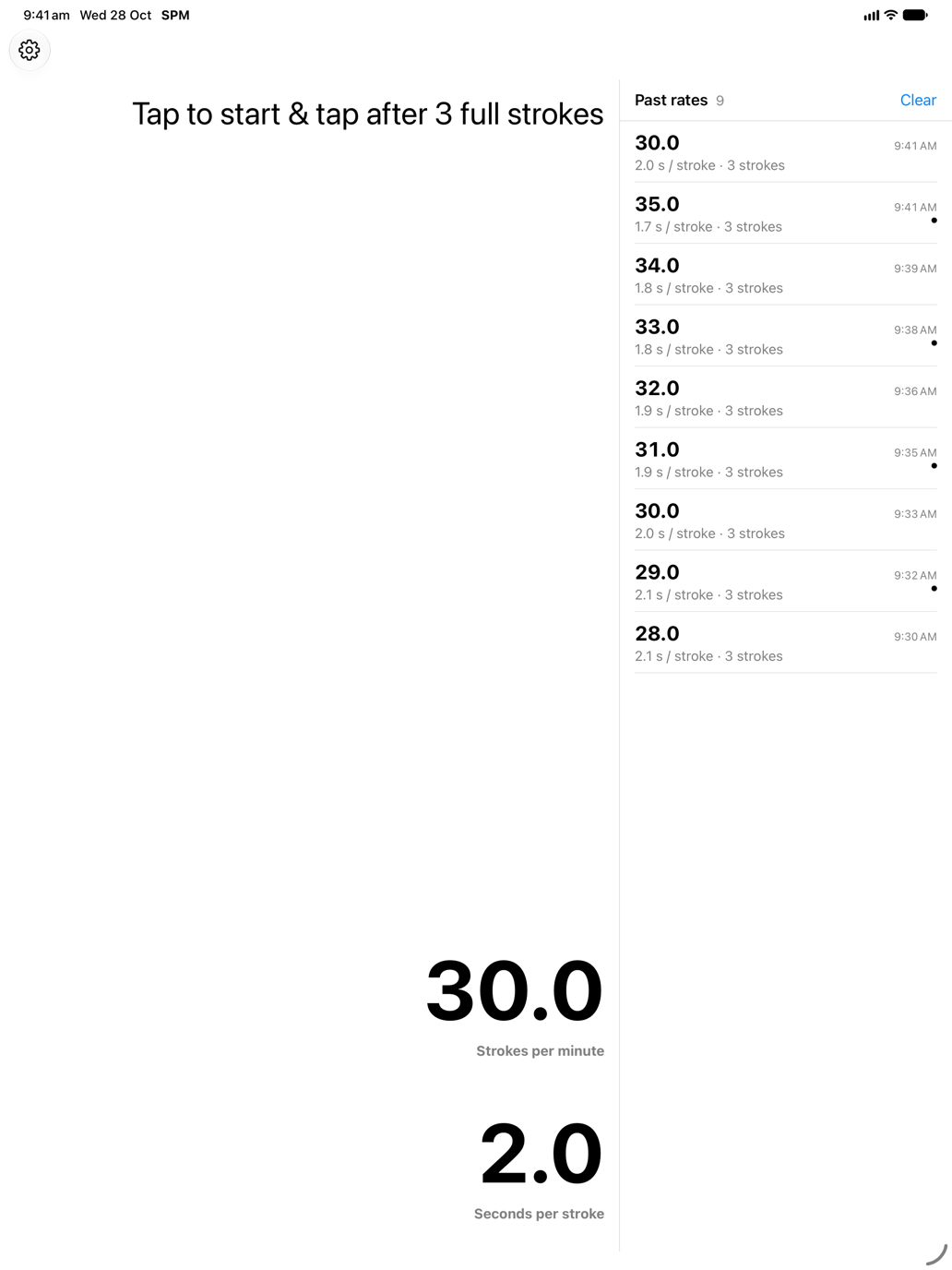
On iPad the screen is wide enough to show more than one number. The past rates column keeps the last readings beside the timer, newest at the top, each with its seconds per stroke and the time it was taken. A piece that starts at 35 and settles to 30 is visible as a column, not a memory.
Built around how coaching actually happens
Eyes on the crew, not the screen
Turn on spoken results and the app reads the rating out the moment it is calculated. You can watch the catch, call the change, and never look down.
The last readings, side by side
On iPad, iPhone Duo and other wide layouts a column of past rates sits beside the timer. See a crew come down from 34 to 30 across a piece without writing anything on your hand.
Crew after crew
In continuous mode each tap finishes one measurement and starts the next, so you can rate every boat as it comes past the launch.
Big numbers from a moving launch
Strokes per minute and seconds per stroke in large type, in light or dark mode. Readable at arm's length with spray on the glass.
Nothing to charge, nothing to lose
It is the phone already in your pocket. Install once and it is on your iPad and Apple Watch too, with your purchase shared across them.
Your rowers' data stays on the device
Stroke rates and timing events are never sent to analytics. Nothing about your crew leaves the boat park.
A session with it
From the launch or the bank, this is the whole routine.
- 1
Pick how many strokes to time
Three by default. Raise it in Settings for a longer, steadier sample, or switch on continuous mode for back-to-back readings.
- 2
Tap at the catch
Tap anywhere on the screen as the blades go in. The whole screen is the button, so you do not need to find it.
- 3
Tap again after the last stroke
Count the strokes, tap on the final catch, and the rating appears. With spoken results on, you hear it too.
- 4
Compare and call the change
Glance at the past rates column on iPad, or just listen to the next reading, and tell the crew what to do with it.
Questions coaches ask
Something else? Contact support
- How accurate is it compared with a rating watch?
- It measures the same thing the same way: elapsed time over a known number of strokes. The accuracy comes down to how consistently you tap at the catch, which is why the default sample is three full strokes rather than one.
- Can I use it from the launch at speed?
- Yes. The whole screen is the tap target and the numbers are large. Many coaches turn on spoken results so they can keep the phone in a pocket or on the dash and simply listen.
- Which iPads show the past rates column?
- Any iPad running iPadOS 18 or later, in portrait or landscape. iPhone Duo shows it when unfolded, and large iPhones show it in landscape where there is room.
- Can I use it during a regatta?
- Coaches can use it from the bank. Phones and watches should not be used inside a boat during a race, to avoid breaking the rules of the event.
Rate the next session
Trusted by rowing coaches since 2014. Download Strokes Per Minute and try it free for 3 days.